
What is an IPO & How to Apply for an IPO on Sahi: Step-by-Step Guide
Learn what an IPO is and how to apply for an IPO. Also get a step-by-step guide on how to apply for an IPO on Sahi.

Team Sahi
What is an IPO?
An Initial Public Offering (IPO) is a company’s first sale of its stock to the public. Think of it as a process through which a private limited company gets converted into a public limited company by allowing external investors to purchase a stake in it. By issuing these shares in an IPO, a company raises capital from investors, and those investors gain fractional ownership of the company.
Post this: once the shares are listed, which is usually a couple of days after the IPO closes, it’s open for trading for everyone. One advantage of IPO investing is the opportunity to enter at the issue price, which may be lower than the post-listing market price. However, there is no certainty of a premium listing, and in some cases, the stock may list at a discount to the issue price.
Some key advantages & disadvantages of IPO investing:
- Early access: You get the opportunity to purchase the shares at the issue price, which can sometimes be lower than the market price after listing.
- High growth potential: Successful IPOs often see the stock price increase significantly, building long-term wealth for investors.
- Equal opportunity: IPO prospectus information is available to all, as both small and large investors have the same access to participate.
Disadvantages:
- No allotment certainty: In popular IPOs, demand often runs many times higher than the shares available. Even if you apply correctly and have funds blocked, allotment is done via a lottery system, meaning you may receive no shares at all.
- Listing-day volatility: IPO stocks can be extremely volatile on the day of listing. Prices may surge or fall sharply based on market sentiment, grey market expectations, or broader market conditions—sometimes moving very differently from fundamentals.
- Limited price discovery: Unlike listed stocks, IPOs lack a public trading history. Valuations are based on projections and peer comparisons, which increases the risk of overpaying if growth expectations don’t materialise post listing.
What You Need to Apply for an IPO
To bid in any IPO, you must meet certain requirements:
- PAN and KYC: A valid PAN card and a KYC-completed brokerage account are mandatory for IPO applications.
- Valid Demat & Trading Account: You need an active demat account to hold shares and a trading account to place orders. If you want to sell IPO shares later, a trading account is required. You can apply for an IPO on Sahi as well. The steps are mentioned in detail later.
- Bank Account with UPI: Indian IPO applications now use ASBA (Application Supported by Blocked Amount) via UPI. You’ll need a bank account linked to a UPI ID to make the payment for the bid.
- Funds: Keep enough money in your bank to cover your bid. You must have at least (lot size × bid price) available. Since Indian IPO lot sizes are capped at Rs 15,000 for retail investors, you will need a maximum of ₹15,000 for 1 lot. Note that retail investors are limited to a total amount of ₹200,000 per IPO. Similarly, to apply in the HNI category, you will need a minimum of ₹2 lakhs.
When bidding, you can specify how many shares (in multiples of the lot size) and at what price (within the IPO’s price band) you wish to apply. You can place up to 3 bids at different prices.
The ASBA process then blocks that bid amount until allotment. If the demand exceeds supply (oversubscription), shares are allotted on a lottery basis, so you may or may not receive an allotment, based on your luck. Ultimately, any unallotted funds are automatically released back to your account.
Now, let’s see the steps to apply for an IPO on SAHI.
Applying for an IPO on the Sahi App: Step-by-Step
Sahi’s mobile app now streamlines IPO applications, making the process almost as easy as placing a stock trade. Here’s how to apply using Sahi:
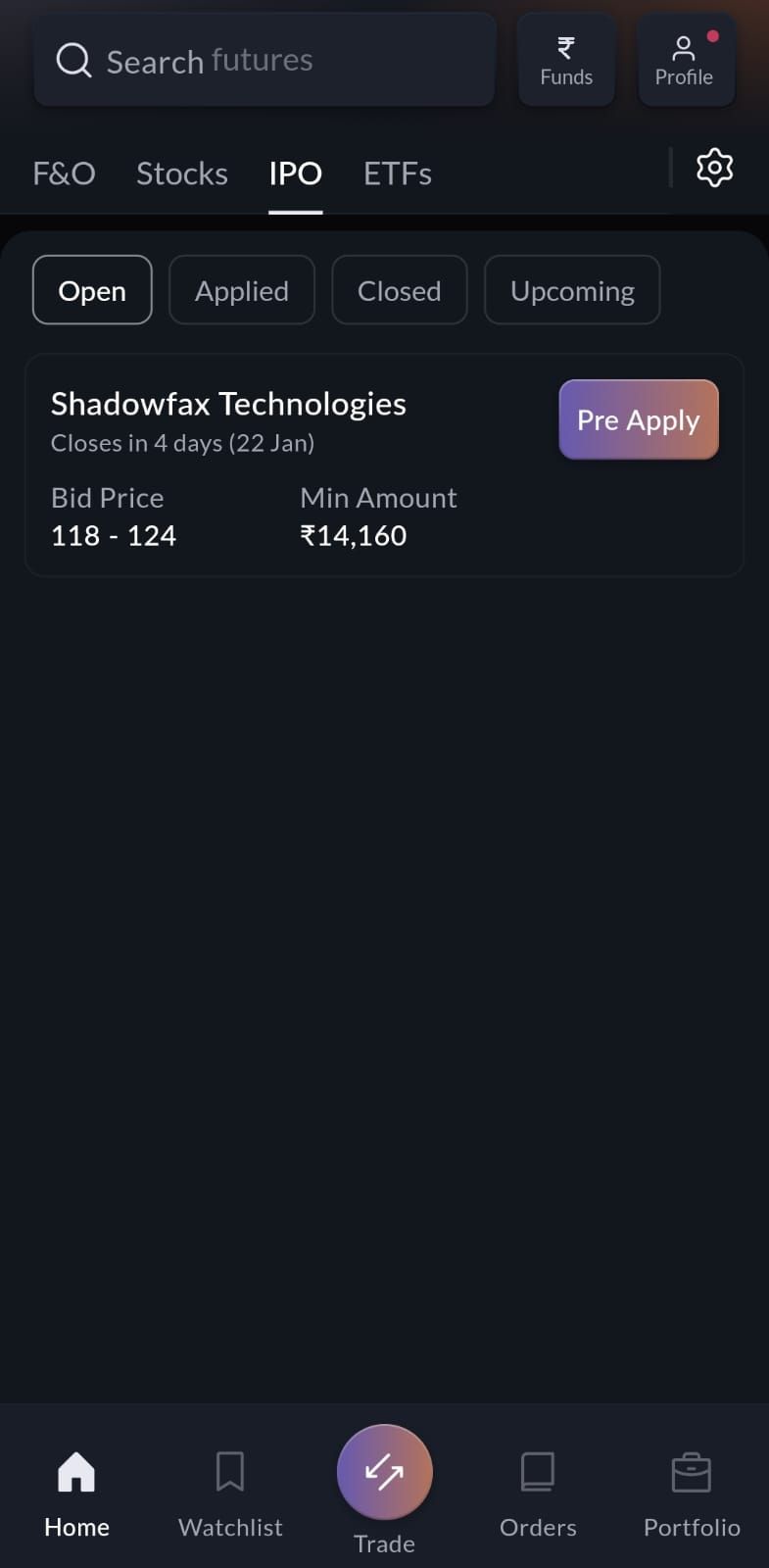
- Open the IPO Section: Launch the Sahi app and tap the IPO tab on the top left corner of the home screen. This brings up a list of all open, applied, closed, and upcoming IPOs. Not only that, you can even pre-apply to an IPO through the app. When you click on the company name under the Open Section, you’ll see the IPO details, including the key numbers like company price band, financials, lot size, open/close dates, etc., and an Apply or Pre-Apply button.
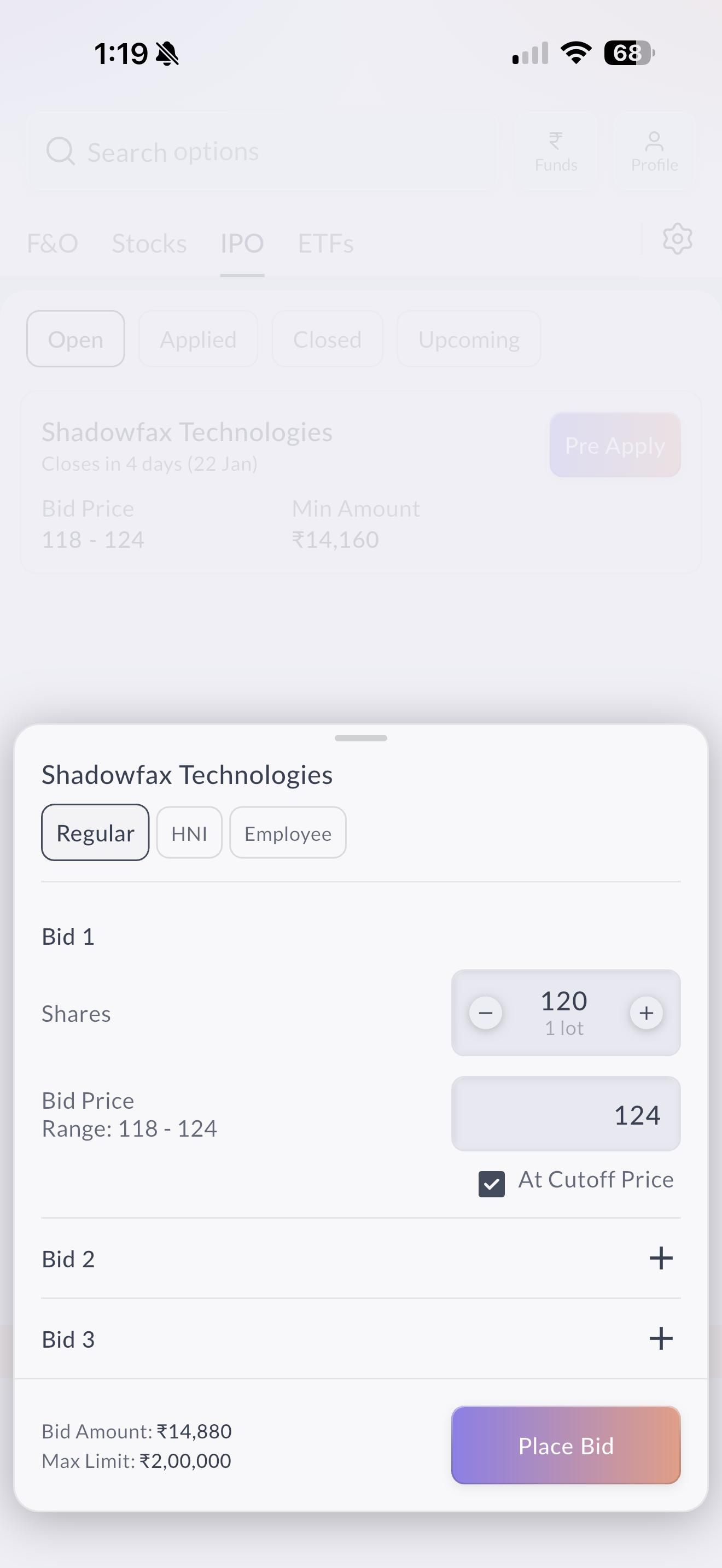
- Select the IPO and Investor Category: Once you click on the Apply/ Pre Apply button, you need to select the investor category between Regular, HNI, and Employee.
- Enter Bid Details: Next, input the number of lots you wish to apply for and your bid price. You can add multiple bids by tapping Add Bid. (Alternatively, to ensure a bid at the highest price, you can simply select “Apply at Cutoff Price” to skip manual bidding. You’ll also be able to see the required amount at the bottom.)
- Apply Using UPI: Once done with the details, the next step is to make the payment. For that, enter your bank’s UPI ID, and tap Place Bid. Sahi will submit your application via the UPI/ASBA mechanism to your bank.
- Approve the UPI Mandate: As soon as you place the bid, Sahi will send a payment mandate to your UPI app for authorization. Open your UPI app and approve the mandate to authorize the block of funds. This confirms your IPO application.
By just following the above steps, you have simply applied for your desired IPO. The next step is to track your application. For that, go to the Applied section in the IPO tab to monitor your order. Sahi updates each step (UPI mandate approval, exchange submission, etc.) in real time.
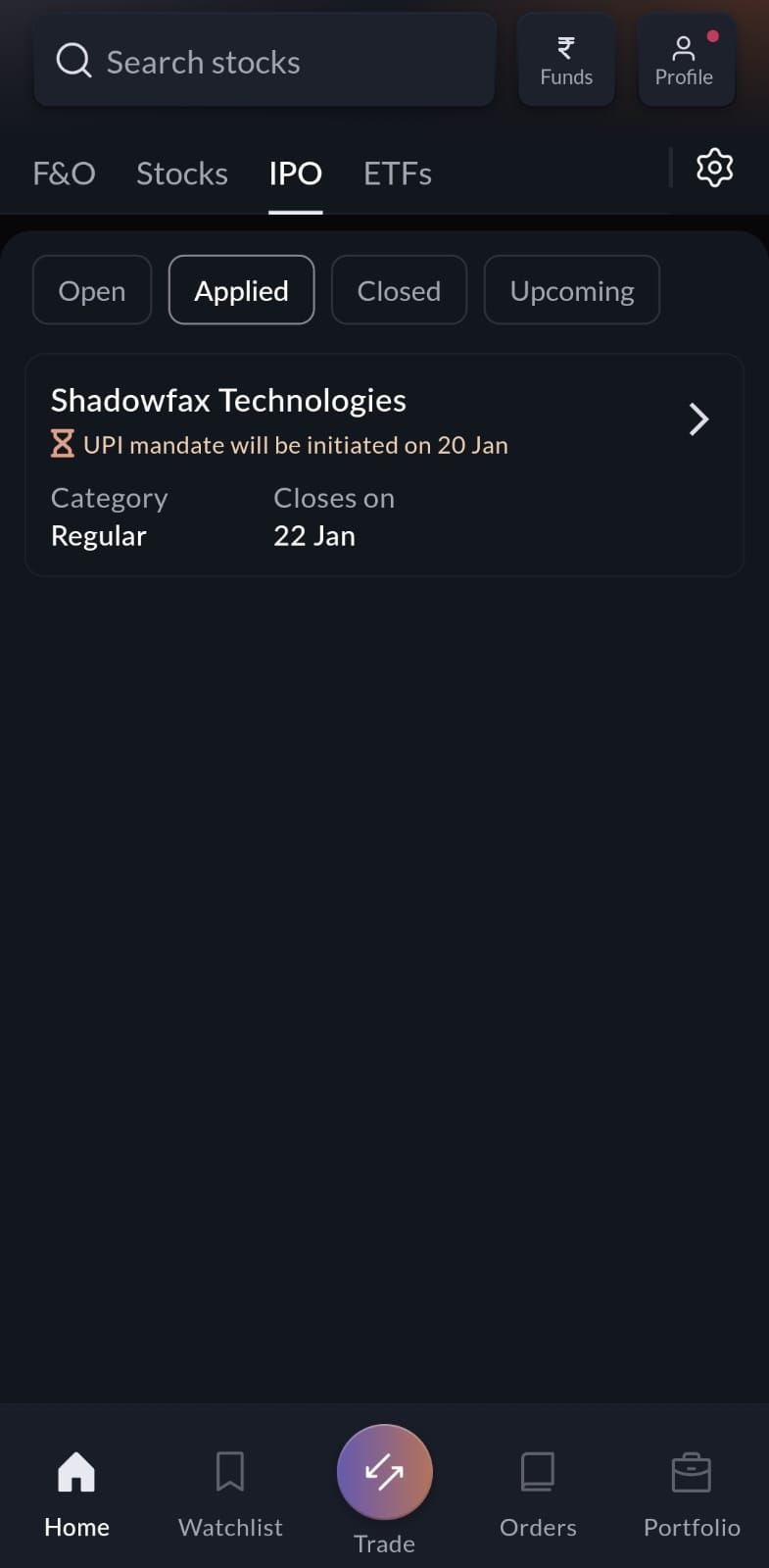
Once allotment is done, Sahi will clearly show whether you’ve been allotted shares. If shares are allotted, they appear in your demat account, and the blocked funds are debited. If not allotted, the money is unblocked in your bank.
Note: Sahi currently supports IPO applications only through UPI (ASBA). You cannot use your Sahi wallet balance for IPO payments. All funds remain in your bank account until allotment.
FAQs
- What do you need to apply for an IPO? You need an active trading + demat account, a valid PAN, and a bank account linked via UPI. In other words, complete your KYC and ensure your bank/UPI is set up in Sahi. Also have enough funds to cover your bid (see below).
- Can I apply through UPI on Sahi? Yes. Sahi mandates UPI for IPO payments. When you place a bid, you enter your UPI ID and then approve the auto-blocking mandate in your bank’s UPI app.
- What payment methods are supported? Currently, Sahi accepts only UPI/ASBA for IPOs. The bid amount is blocked in your bank account – Sahi wallet funds cannot be used.
- How much money do I need to apply? To apply for the retail category, you need up to Rs 15,000, which will be enough to cover the bid (lot size × price). For example, if the lot size is 60 shares at ₹240, you need ₹14,400 in your bank.
Related
Orkla India IPO Allotment Status, Subscription & Listing Details
Canara Robeco AMC IPO Allotment Status, Subscription & Listing Details
Aequs IPO Listing Sees 101.63× Subscription Ahead of Listing
Fujiyama Power Systems IPO Allotment Status: How to Check
Recent
Indicator Templates: Build Once. Trade Faster Forever.
Pledging in Trading: How Traders Use Their Portfolio as Trading Capital
How to Read the Option Chain to Predict Market Moves in Weekly Expiries?
Bharat Coking Coal IPO Lists at 96% Premium: Market Verdict Defies GMP Cool-Off